v0.2.2 - Custom Tasks & Session Hooks

Seamless AI Provider
Switching for Claude Code

Switch between Claude and GLM APIs instantly. Monitor usage in real-time. Manage multiple sessions with different models.

Powerful Features

Everything you need to manage multiple AI providers and monitor your API usage efficiently.

๐Ÿ”„

Provider Switching

Instantly switch between Anthropic Claude and GLM (Z.AI) APIs without changing your Claude Code configuration.

๐Ÿ“Š

Usage Monitoring

Track token usage, request counts, and costs in real-time. View stats by model, daily, or session.

๐ŸŽฏ

Session Management

Run multiple Claude Code instances with different vendors and models. Each session is independently configurable.

๐Ÿ”

Secure Storage

API keys are stored securely in local encrypted storage. Your credentials never leave your machine.

๐ŸŒ

Multi-language

Full support for English, Korean, Japanese, and Chinese interfaces.

๐Ÿ–ฅ๏ธ

System Tray

Runs quietly in system tray. Quick access to start/stop proxy and view status at any time.

โš™๏ธ

Custom Tasks

Intercept messages with >>swiftcast to run shell commands, HTTP requests, or read files.

๐Ÿช

Hook System

Powerful hooks for logging, context injection, and custom behavior. Configure per-session or system-wide.

How It Works

SwiftCast acts as a local proxy between Claude Code and your AI providers. See it in action.

1

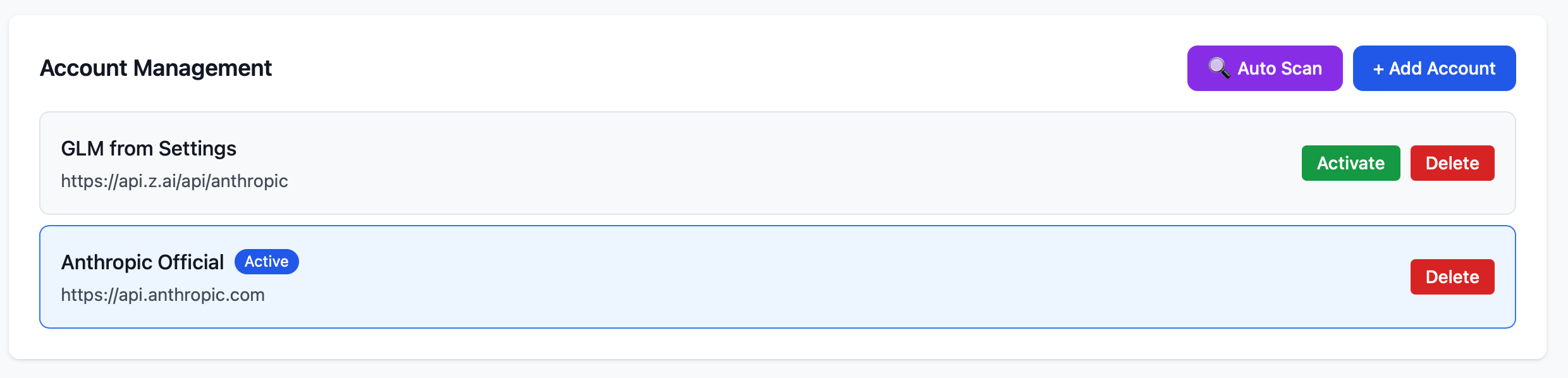
Add Your AI Accounts

Register your Anthropic (Claude) and GLM API accounts. Use Auto Scan on macOS to automatically import existing Claude credentials from Keychain, or add accounts manually with your API keys.

  • โœ“ One-click Auto Scan for macOS
  • โœ“ Support for multiple providers
  • โœ“ Secure local storage
Account Management
2

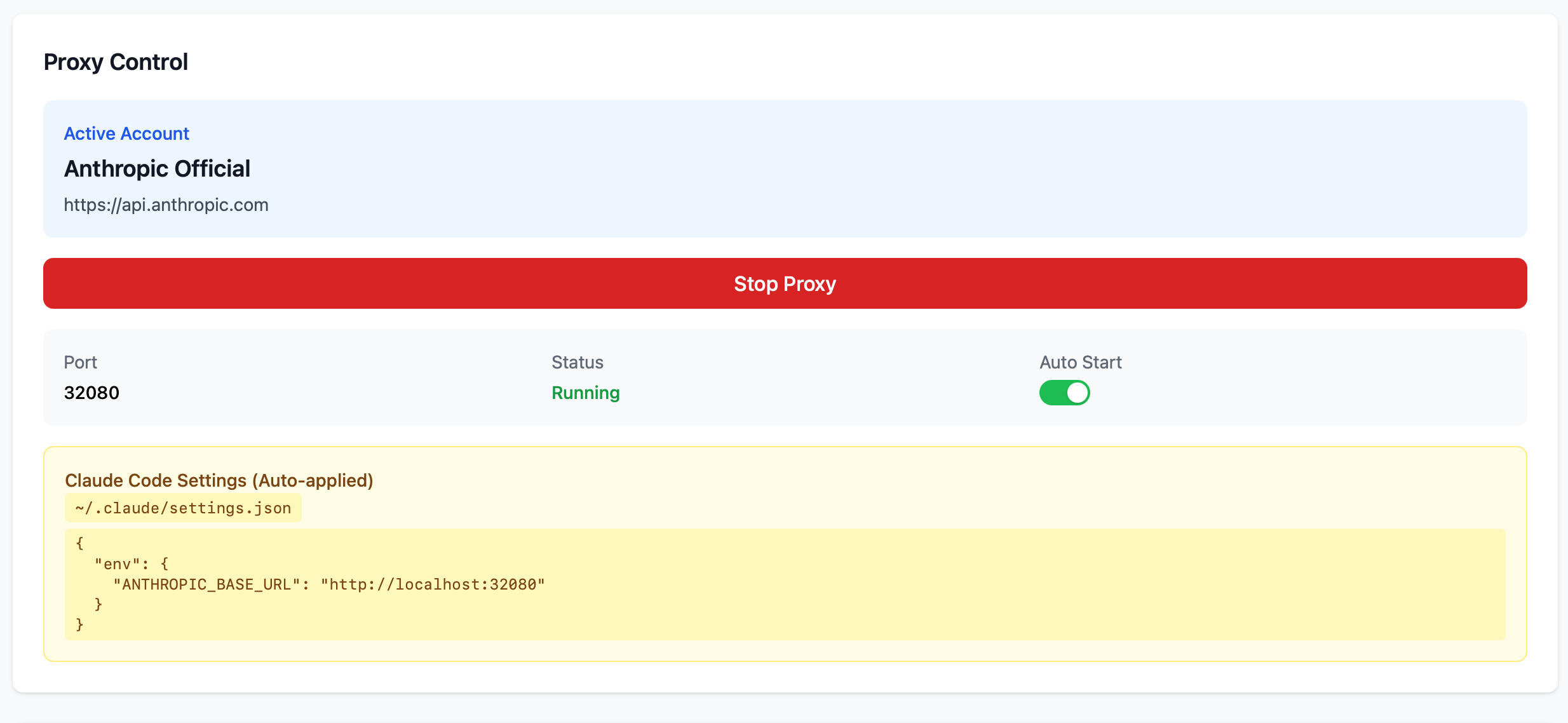
Start Proxy & Control Dashboard

Launch the proxy with one click. SwiftCast automatically configures Claude Code's settings.json to route through the local proxy. Switch between providers instantly.

  • โœ“ Auto-configure Claude Code
  • โœ“ Real-time proxy status
  • โœ“ System tray for quick access
Dashboard
3

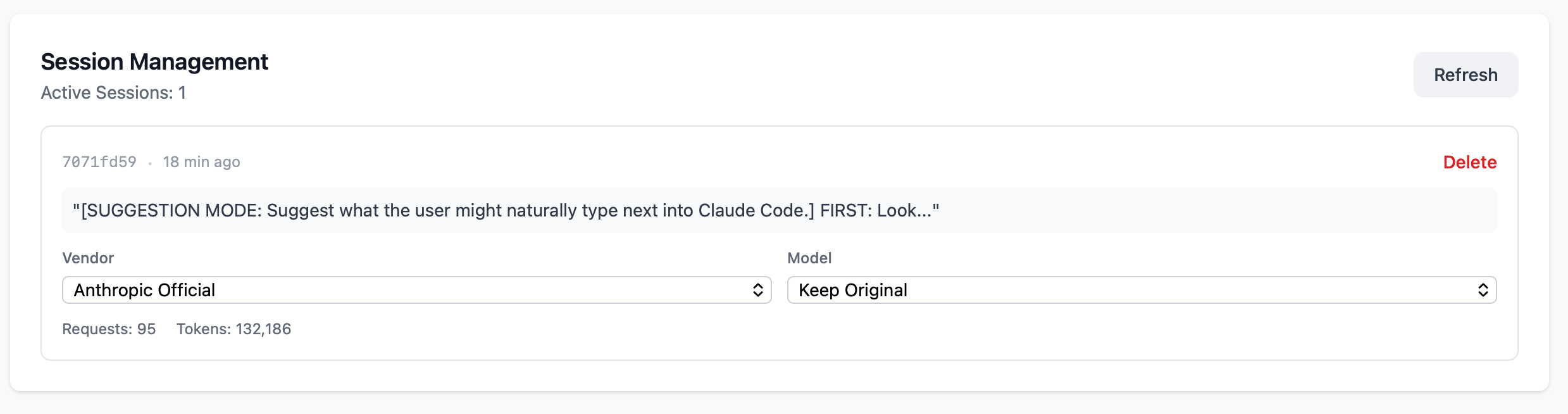
Manage Multiple Sessions

Run multiple Claude Code instances with different configurations. Assign different vendors and models to each session. Perfect for A/B testing or cost optimization.

  • โœ“ Per-session vendor selection
  • โœ“ Model override per session
  • โœ“ Live session tracking
Session Management
4

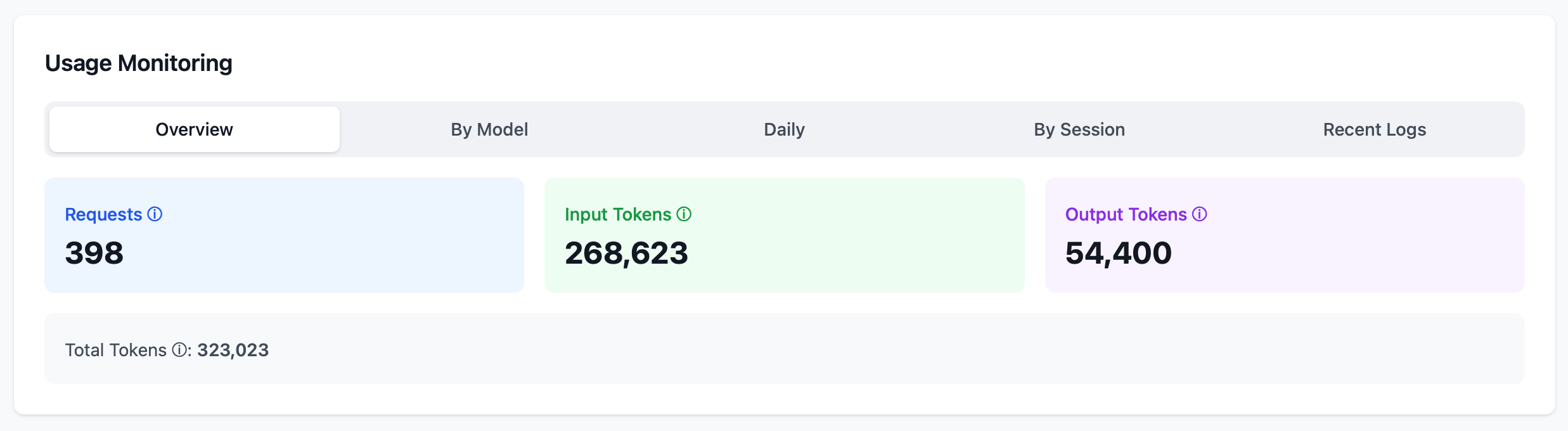
Monitor Usage in Real-Time

Track token consumption across all sessions. View detailed breakdowns by model, day, or session. Optimize costs by understanding your usage patterns.

  • โœ“ Token usage by model
  • โœ“ Daily usage trends
  • โœ“ Per-session statistics
Usage Monitoring
View Full User Guide

Use Cases

SwiftCast is perfect for developers who need flexibility with AI providers.

๐Ÿ’ผ Cost Optimization

Use different providers for different tasks. Route simple tasks to cheaper models while keeping complex work on Claude Opus.

๐Ÿงช A/B Testing

Compare outputs between Claude and GLM for the same prompts. Run parallel sessions with different models to evaluate quality.

๐Ÿ“ˆ Usage Tracking

Monitor token consumption across all your AI interactions. Track costs by project using different sessions.

๐Ÿ”€ Fallback Support

When one provider is rate-limited or down, quickly switch to another without interrupting your workflow.

Custom Tasks & Hooks

Extend SwiftCast with powerful automation and customization features.

โšก Custom Tasks

Intercept Claude messages starting with >>swiftcast <task> to execute shell commands, HTTP requests, or file operations. Configure in ~/.sessioncast/tasks.json.

๐Ÿ“ API Logging

Log all API requests and responses to JSON files for debugging, auditing, or analysis. Enable/disable per session.

๐Ÿ’‰ Context Injection

Automatically inject custom context during conversation compaction. Keep your project rules and preferences persistent across long sessions.

๐ŸŽ›๏ธ Session-Level Config

Override system settings per session. Enable/disable logging, custom tasks, or context injection for specific sessions via API.

View Custom Tasks Guide

Ready to Get Started?

Download SwiftCast and take control of your AI provider management.